5/5
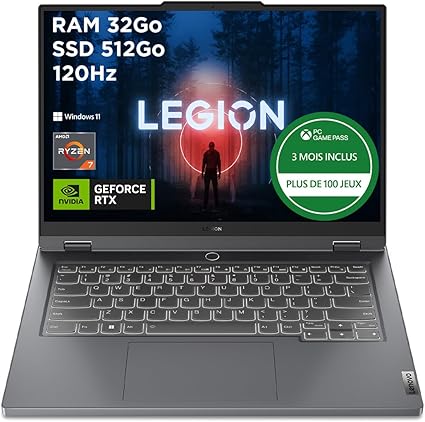
Lenovo Legion Slim 5 (Ryzen 7 / RTX 4060 / 32GB / 512GB)
The best overall balance for CAD and simulation
- Ryzen 7
- 32GB RAM
- RTX 4060
- 512GB SSD
Updated in 2026
For modeling students, a bad purchase becomes painful fast: not enough RAM, weak GPU, saturated SSD, and slow 3D projects. The goal is to choose a coherent machine for CAD, simulation, and student rendering over several years.
A strong setup for CAD, complex assemblies, and early 3D rendering without jumping to overpriced workstation territory.
Best suited if you really do 3D, simulation, or rendering on a regular basis.
3D CAD, simulation, light to medium rendering, team projects, and demanding software.
Because it matches the real needs of a modeling track:
The classic mistake is buying a very thin laptop with soldered 16GB RAM. In modeling, margin matters more than design.
CPU
Intel i7 / Ryzen 7 recommended
RAM
32GB ideal, 16GB minimum
SSD
1TB preferred
Weight
1.7 to 2.1 kg depending on power
Battery
6h realistic minimum
GPU
RTX 4050/4060 or equivalent
Always validate the exact GPU, whether RAM is soldered, and the cooling design.
For modeling, the key balance is CPU, RAM, GPU, and cooling.
| Model | CPU | RAM | SSD | Ideal for |
|---|---|---|---|---|
| ⭐Lenovo Legion Slim 5 | Ryzen 7 | 32GB | 512GB | Most balanced choice |
| Acer Nitro V 15 | Intel i7 | 16GB | 512GB | CAD and light rendering |
| ASUS ROG Zephyrus | AMD Ryzen 9 | 32GB | 1TB | Handle everything without slowdowns |
Selection
Here is a selection of configurations that offer a good balance for modeling.
The best overall balance for CAD and simulation

A genuinely reasonable price for real 3D workloads

A very powerful laptop that can handle everything
Two useful reads before locking your final setup.
To connect your purchase to the software you will really use.
Read articleTo turn your usage into a practical requirement sheet.
Read articleThe goal is not the most powerful machine, but the one that avoids bottlenecks in real projects.
Mechanical design software likes modern CPUs, enough RAM, and fluid viewport performance. A too-light machine becomes frustrating on larger assemblies.
Some simulations stress mostly the processor and memory. You need a stable machine that still has headroom when models grow.
Even without pro rendering, you may still export 3D scenes, previews, and heavy visuals where a dedicated GPU brings real comfort.
The laptop still has to be portable for classes, group work, and home use. In modeling, the target is balance, not an unusable powerhouse.
Assemblies, textures, parts libraries, and exports grow quickly. 1TB avoids early dependence on external storage.
Workloads usually increase between year one and advanced projects. Slight over-dimensioning is often safer than the opposite.
In modeling, under-sizing often costs more in the medium term. If your track really uses CAD and simulation, starting with the right machine avoids early replacement.
You do not need an extreme workstation. A good Ryzen 7 or Intel i7, 16 to 32GB, and a mid-range dedicated GPU already covers a lot.
Intel i7/Ultra 7 vs Ryzen 7?
Minimum: 16GB
In modeling, you can quickly combine:
16GB is enough to start seriously. 32GB is more comfortable if you want fewer limits on heavier projects.
If RAM is soldered and capped at 16GB, make sure it really fits your track. In modeling, that limit shows up faster than in standard coding workflows.
Minimum: 512GB, 1TB preferred
Parts libraries, exports, renders, and project files make 1TB much more comfortable across a full study cycle.
Dedicated GPU often becomes useful
For 3D work, viewport smoothness and some rendering tasks, an RTX 4050/4060 or equivalent brings real comfort. Integrated graphics mainly fit lighter use.
Minimum: 6h realistic
Dedicated-GPU systems consume more. The goal is not record battery life, but a laptop you can still use in class without constant stress.
Stay under 2.1 kg when possible
You will carry it often. A slightly heavier chassis can be justified, but should not become a daily pain.
The answer is more one-sided than in general computing: for modeling, Windows is usually the simpler choice because of software and GPU compatibility.
It is the most rational choice if you want fewer surprises in CAD, simulation, and student rendering.
Limits to keep in mind:
A Mac can work if your school and software stack support it, but compatibility must be validated before buying, especially for CAD.
Linux can help for some tools, but in modeling it is rarely the main recommended platform for software compatibility.
For most modeling students, a good Windows laptop with a coherent dedicated GPU remains the safest choice.
Buying an ultrabook without dedicated GPU
You may hit limits quickly on 3D work and heavier scenes.
Staying locked to soldered 16GB RAM
Fine for starting, but less reassuring over the full cycle.
Picking an overly heavy gaming laptop
Power is useless if carrying it becomes painful.
Choosing from GPU marketing alone
Cooling, RAM, and display quality matter a lot too.
FAQ
Updated in 2026
If you want a coherent CAD and simulation setup:
Lenovo Legion Slim 5 – Ryzen 7 / RTX 4060 / 32GB / 1TB
See on Amazon