
Simulate a student modeling scenario
Written by Titouan Jouanot-Goupil · engineering student · ·
1. Why am I buying this computer?
Define your main goal: classes, personal projects, advanced simulation, 3D rendering, or internship-related workflows.
2. What do I really need?
List the software required by your curriculum and identify the most demanding tasks you will run each week.
The right reflex is to start with required software, not product pages.
3. What will I actually use my computer for?
Modeling, simulation, multitasking with a browser, and collaboration tools: quantify these activities clearly.
4. What budget can I afford?
Set a realistic budget range that includes accessories, possible RAM upgrades, and warranty coverage.
5. Where will I use my laptop?
Campus, home, commuting: your usage context changes the right balance between weight, battery life, and durability.
6. When will I use my laptop the most?
Identify peak usage periods before project reviews and exams, not just your average weekly workload.
7. How will my needs evolve?
Project yourself into years 3 and 4, when simulations, team projects, and software demands are often much higher.
Final question
If your workload clearly increases in years 3 or 4, your purchase should already account for that growth.
Our recommended PCs
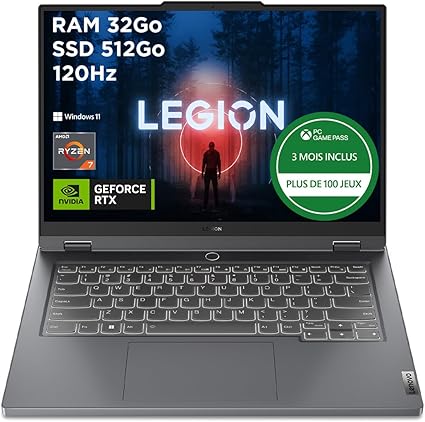
Lenovo Legion Slim 5 (Ryzen 7 / RTX 4060 / 32GB / 512GB)
The best overall balance for CAD and simulation
- Ryzen 7
- 32GB RAM
- RTX 4060
- 512GB SSD

Acer Nitro V 15 (Intel Core i7 / RTX 5060 / 16GB / 512GB)
A genuinely reasonable price for real 3D workloads
- RTX 5060
- Upgradeable to 32GB RAM
- Lower price
Amazon affiliate links: the price does not change for you, but it helps fund the site.
FAQ
Frequently asked questions
Updated in 2026
Changelog
- Q1 2026: Introduced the baseline student scenario method and core questions.
- Q2 2026: Added budget, usage location, and scheduling criteria.
- Q3 2026: Strengthened long-term planning for years 3 and 4 workloads.
Turn vague needs into concrete requirements
A strong student scenario gives you a clear checklist. You can then compare models objectively and choose a durable computer.
See the modeling guide