Choose the best modeling software
Written by Titouan Jouanot-Goupil · engineering student · ·
1) Pricing and student ecosystem
Before comparing features, look at the real software cost across your full study cycle.
- Check for free or heavily discounted student licenses
- Compare total cost over 3 to 5 years
- Anticipate paid options: cloud, plugins, simulation modules
2) Real workflow: CAD, surfacing, simulation
Some tools are stronger for mechanical CAD, others for advanced surfacing or numerical simulation. Start by listing the projects you will actually build.
The best software for your program is not always the most popular one on YouTube.
3) Ergonomics and productivity
A powerful tool with a steep learning curve can cost you an entire semester. Test interface quality, shortcuts, documentation, and training material availability.
What to test quickly
- How long it takes to learn the basics
- Shortcut quality and interface clarity
- Availability of tutorials that match your level
4) Compatibility with your computer
Before committing, validate CPU, RAM, GPU requirements and OS stability. Poor compatibility creates friction even on a good machine.
If your target software requires a dedicated GPU or a lot of memory, cross-check it with the modeling laptop guide.
Our recommended PCs
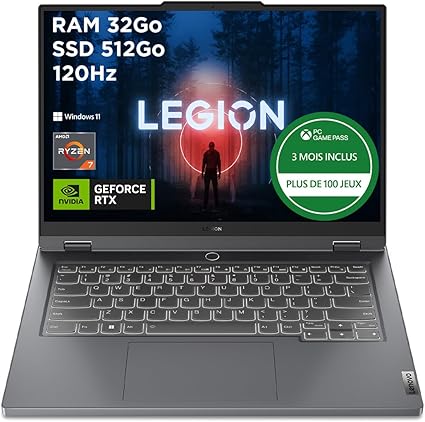
Lenovo Legion Slim 5 (Ryzen 7 / RTX 4060 / 32GB / 512GB)
The best overall balance for CAD and simulation
- Ryzen 7
- 32GB RAM
- RTX 4060
- 512GB SSD

ASUS ROG Zephyrus (AMD Ryzen 9 / RTX 4070 / 32GB / 1TB)
A very powerful laptop that can handle everything
- RTX 4070
- 32GB RAM
- 1TB SSD
- OLED display
Amazon affiliate links: the price does not change for you, but it helps fund the site.
FAQ
Frequently asked questions
Updated in 2026
Changelog
- Q1 2026: Updated pricing and student license comparison criteria.
- Q2 2026: Added usability recommendations based on student feedback.
- Q3 2026: Revised CPU, RAM, and GPU compatibility constraints.
Match your software to your laptop
Choose software that matches your projects, not market hype. The winning trio is simple: controlled cost, clear ergonomics, and stable performance.
See the modeling guide